About Soliton MailZen
Soliton MailZen is the perfect solution to have secure access to the office workspace and applications, regardless of time and location, online and offline, without any MDM profile and restriction. All business...
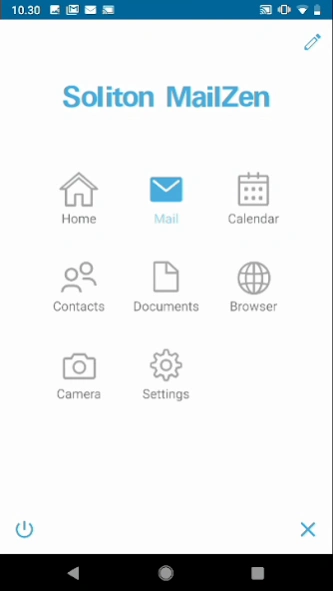
Soliton MailZen is the perfect solution to have secure access to the office workspace and applications, regardless of time and location, online and offline, without any MDM profile and restriction. All business applications and data are kept within an encrypted container. MailZen provides complete separation of business and personal data, the administrator can only control the secure container and not the private apps.
* IMPORTANT: The MailZen app is free, but requires signup for the MailZen services. Contact your IT department for further assistance.
***
Security:
- Secure container separating private and business data (required for COPE/BYOD)
- Military-grade encryption based on industry standards (S/MIME, RSA, AES, EC)
Infrastructure:
- Supports MS Exchange and O365
- Supports IBM Domino
- Supports various MDM systems (e.g. MobileIron and AirWatch)
- Can also be managed without MDM
- Provides integration with PKI and AD
Email:
- Send and receive end-to-end encrypted emails (S/MIME standard)
- Messages are sender-verified through S/MIME signature
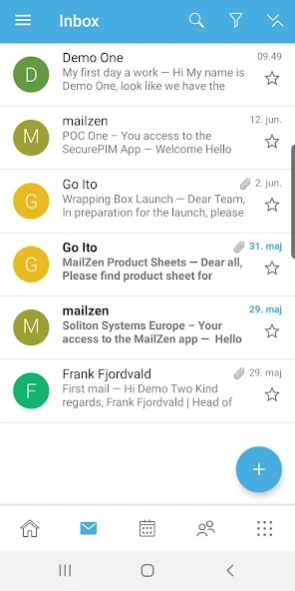
- Send, receive, flag, navigate and organize emails easily
- Notifications with background email fetching
- Set custom “out of office” message
- Open attached documents with Polaris Editor
Calendar:
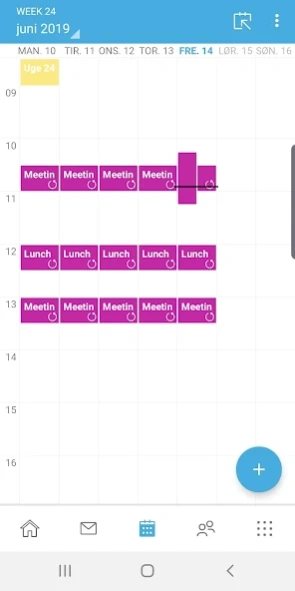
- Easily manage events using a mobile device
- Organize meetings and invite attendees to appointments
- See meeting conflicts directly in email invitation with a one click-jump to calendar details
- Display private appointments from the device calendar and appointments from other Exchange accounts and/or from IBM Traveler
Contacts:
- Manage business contacts quickly and easily
- Access to corporate Global Address List, Domino Directory
- Export of contacts for caller recognition (only phone number and email)
- Other messenger apps (WhatsApp, Facebook, …) cannot access contact details inside the container
Documents:
- Documents and spreadsheets are stored inside the secure container
- Documents are isolated from other apps and users
- Send sensitive documents encrypted via email
- Edit documents in Polaris Office Editor without leaving the secure container
Tasks :
- Synchronize and manage tasks
Camera:
- Sensitive pictures are stored securely inside the secure container
- Pictures are isolated from other apps and users
- Send pictures encrypted via email
Browser:
- Our new Browser has got a lot of cool features: Multi Tab*, Bookmarks*, Company provided bookmarks*, Black/Whitelist*, FileUpload*, Control Cookies, Desktop Mode
*Feature can be turned on/off in the MAM
***
Previous Versions
Here you can find the changelog of Soliton MailZen since it was posted on our website on 2020-12-04 21:03:22.
The latest version is and it was updated on 2026-10-12 12:59:44. See below the changes in each version.
Soliton MailZen version
Updated At: 2026-09-01
Changes: +++ Hotfix: Crashes During Login Fixed +++
With this hotfix (9.8.2), we have fixed a bug that, under certain circumstances, could cause the app to crash unexpectedly during the login process. The app is now running stably again as usual.
Please update MailZen for Android to hotfix version 9.8.2.
Soliton MailZen version
Updated At: 2026-08-13
Changes: 🌟 New Features
* Full compatibility with Android 16
🚀 Further Improvements
* Optimized Usage Across All Screen Sizes – Including Foldables
* More Reliable Re-Authentication for Expired Sessions
🐛 Resolved Issues
* Calendar Display Issue
* Display Issue on App Introduction Screen
* Duplicate Calendar Entries
* Issue in Mail Composer View
Soliton MailZen version
Updated At: 2026-05-13
Changes: 🌟 New Features
* Compatibility with Android 16 Ensured
* Announcement: Android 12 Will no Longer be Supported Starting in June
🚀 Further Improvements
* Seamless Continuation of Email Drafts
* Navigation Bar Updated
* Improved Swiping
* Background Optimizations
🐛 Resolved Issues
* Email Synchronization Stopped in Certain Situations
* Crash in App
* Missing WebDAV Server Names
* Incorrect Display on App Start
Soliton MailZen version
Updated At: 2026-01-12
Changes: 🌟 New Features
* Improved View when Creating Appointments in the Calendar
* Improved Overview in the Calendar
* Team Mails now also Available Offline
* Swiping in the Team Mails Module
🚀 Further Improvements
* Android 16 in Preparation – Android 12 Support Ending
🐛 Resolved Issues
* App Crashes when Using the Mail Module
* Missing Keyboard Display when Saving Documents
* Error when Replying in Mail Module
* Error Adding Mailboxes
Soliton MailZen version
Updated At: 2025-09-19
Changes: ✅ Polaris Update: Extended License, the grey block is gone! ;-)
🌟 New Features
* Scrolling to Infinity in Shared Mailboxes
🚀 Further Improvements
* Improved Error Detection for Invalid Email Addresses
* Some fine-tuning on the UI
🐛 Resolved Issues
* Some minor issues were resolved
Soliton MailZen version v8.9.0
Updated At: 2024-09-16
Changes: + New Features
++ Team Mail: Swipe Options for Emails
++ Individual Security Settings for S/MIME
+ Further Improvements
++ Enhanced User Interface in the Mail and Team Mails Module
++ Improvements for Team Mails
+++ Managing Keys in Shared Mailboxes
+++ Message When Internet Connection is Missing
+++ Timeless Flexibility – Load Older Messages into Your Folders
+ Resolved Issues
++ Missing Spaces in a Dialog of the Browser Module
Soliton MailZen version v8.8.2
Updated At: 2024-03-18
Changes: New Features
+ Team Mails Innovations
++ Read and Send Encrypted Emails
+ Further Improvements
++ Improvements for Teams Mails
++ Loading Data Without Internet Connection
++ Changes in S/MIME Functionality
+++ Manage Multiple Certificates for One Recipient
+ Resolved Issues
++ Android 14 on Google Pixel
++ Internal Websites not Accessible
++ Misleading Message for Office 365 Accounts
Soliton MailZen version
Updated At: 2023-12-22
Changes: + Preparations for Android 14
+ New Features
+ Edit Shared Mailboxes
+ Further Improvements
+ Show Loading State When Switching Folders
+ Adapted User Interface on Large Tablets
+ Fine tuning of the app
+ Resolved Issues
+ MailZen Crashes on sending certain emails
+ Encrypted Emails not Legible
+ No Events in Calendar
+ News for Admins
+ !! Preparing for End of Support for TLS 1.0 and 1.1 !!
Soliton MailZen version
Updated At: 2023-10-17
Changes: + Team Mails Innovations
+ Notification for Sent Email
+ Clipboard "On only in MailZen"
+ More Options for Attachments
+ Further Improvements
+ Notification in Case of Suspicious Recipient Address
+ Resolved Issues
+ Exchange Account Error
+ News for Admins
+ Preparing for End of Support for TLS 1.0 and 1.1!
Soliton MailZen version
Updated At: 2023-06-29
Changes: * Write, Manage and Delete Emails with Team Mails...
* Create New Emails
* Create, Edit and Send Drafts
* Reply to and Forward Emails
* Respond to Meetings
* New Home Screen
* Language support changed
Disclaimer
Official Google Play Link
We do not host Soliton MailZen on our servers. We did not scan it for viruses, adware, spyware or other type of malware. This app is hosted by Google and passed their terms and conditions to be listed there. We recommend caution when installing it.
The Google Play link for Soliton MailZen is provided to you by apps112.com without any warranties, representations or guarantees of any kind, so access it at your own risk.
If you have questions regarding this particular app contact the publisher directly. For questions about the functionalities of apps112.com contact us.